
To prevent abuse of the CanIPhish platform, we require that you provide evidence of authorisation to phish or train employee email addresses that use a specific domain. We perform this through a challenge-response email which contains an authorisation code.
Table of Contents:
Domain Verification
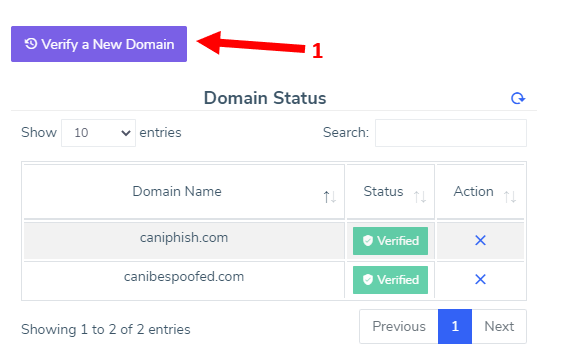
While on the Employees page, click 'Domain Verification' and then perform the following actions:
[1] Click 'Verify a New Domain' to begin the authorisation process.
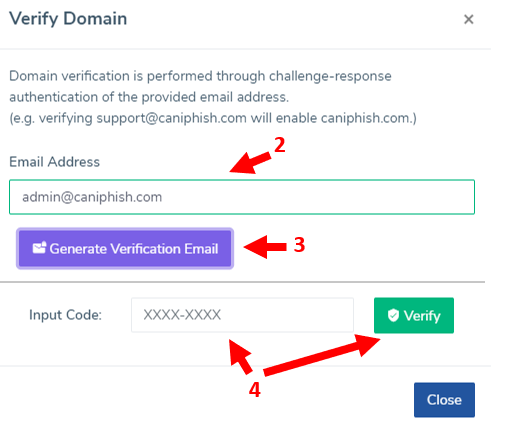
[2] Input a mailbox under your control or under someones control who can provide you with the authorisation code.
[3] Click 'Generate Verification Email' to generate the authorisation email.
[4] Once received, copy the verification code into the input provided and click Verify
[2] Input a mailbox under your control or under someones control who can provide you with the authorisation code.
[3] Click 'Generate Verification Email' to generate the authorisation email.
[4] Once received, copy the verification code into the input provided and click Verify
Domain Locking
Domain locking is a feature available to customers who have a Professional or Enterprise tier subscription. Domain locking essentially notifies CanIPhish that no other CanIPhish customer should be able to verify the domain and it's exclusively locked to your tenant - permanently. This mitigates circumstances where an unrelated employee may have their email compromised, and an attacker who controls their inbox, could create a CanIPhish account under their compromised email. They could then abuse CanIPhish's domain verification process and unlock the ability to send emails to your business domain. Domain locking is a security feature to mitigate against circumstances like this.
To implement domain locking, go to the Employees page and click 'Domain Verification'. Once opened, you'll notice a a Lock icon in the Actions column, for any domain that's verified. This means you can lock the domain to your CanIPhish tenant:
Once a domain is locked, you'll notice the status updates to "Verified & Locked" as depicted in the screenshot above.
Should you have any difficulties, please don't hesitate to contact us.
Comments
0 comments
Please sign in to leave a comment.